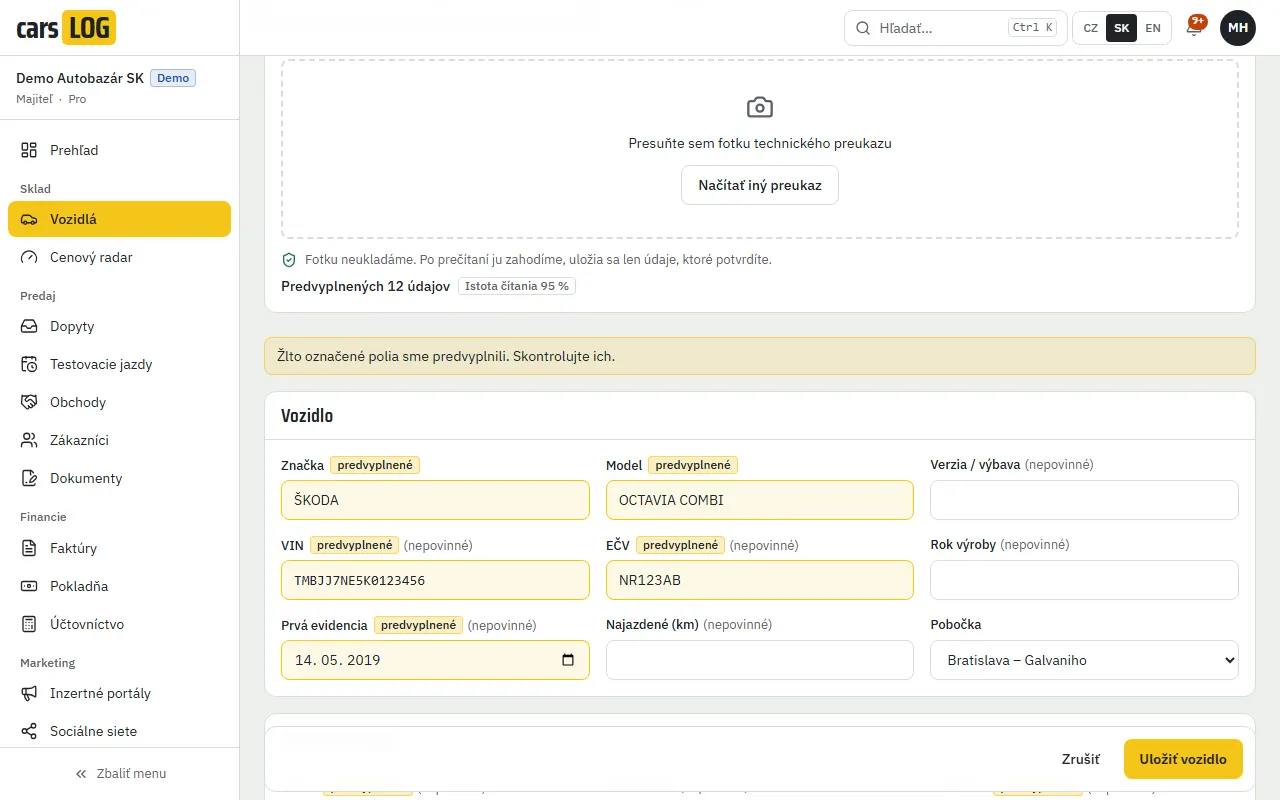
Photograph the registration document. The vehicle record fills itself in.
carsLOG reads the vehicle registration document and the customer’s ID from a phone photo and puts the details into the form. You check them and save. Contracts, invoices and adverts then draw on that one vehicle record.
- fields from the registration document – from VIN and number plate to emission class
- 14
- fields added by the VIN decoder – from make to number of doors
- up to 10
- document photos stored – the image is discarded once read
- 0
Registration document from a photo
Take a photo of the registration certificate, part I or II, on a phone or tablet and carsLOG reads the vehicle details from it. A JPEG, PNG or WebP photo is all it needs.
- VIN, number plate, make, model, trim, year and date of first registration
- fuel, power in kW, engine size, body type, colour, number of seats and emission class
- the registered keeper’s name and address are not copied into the vehicle record
VIN decoder when the document is not to hand
Enter the VIN, carsLOG checks its format and looks the vehicle up in a public VIN database. Only what the database actually returned goes into the form.
- make, model, model year, body type and fuel
- engine size, power, gearbox, drive and number of doors
- power converted from horsepower is not filled in automatically – carsLOG only offers it for you to check
Customer details from an ID document
When you sell or buy in a car, photograph the customer’s ID card or passport and the customer record fills itself in. Only the extracted details are stored, never the photo.
- first name, surname and date of birth
- document type and number
- street, town, postcode and country
Entered once for the whole deal
Vehicle and customer details flow into the purchase contract, the handover report, the invoice, the advert and your dealership website. Nothing is typed twice.
Try it on your own registration document.
Create an account and scan your first car. Fourteen days free, no payment card.
Frequently asked questions
Do I need a scanner to read the document?
No. A photo from a phone or tablet in JPEG, PNG or WebP format is enough. PDF files are not read.
Does carsLOG store photos of documents?
No. The photo of the registration document or ID is held in memory only while it is read and is then discarded. Only the details you confirm in the form are saved.
Is anything saved without my check?
No. The extracted details are only put into the form. You check them, correct them if needed and only then save.
How much does reading a document cost?
Reading a registration document or an ID is paid for with credits according to the price list. Credits are reserved before reading and returned if reading fails.
Do I pay for the VIN decoder too?
No. VIN look-ups use no credits and the VIN decoder is included in every plan.