Invoices, cash desk and the accountant’s export in one place.
carsLOG issues the invoice from the deal details under the VAT scheme the sale needs and adds a QR code for payment. Cash goes into the cash desk, and your accountant gets an export for POHODA or a CSV file.
- document types: invoice, proforma invoice, credit note and cash receipt
- 4
- VAT schemes: standard, margin scheme for second-hand goods, reverse charge and non-VAT-registered
- 4
- QR standards: PAY by square for SK and QR Platba for CZ
- 2
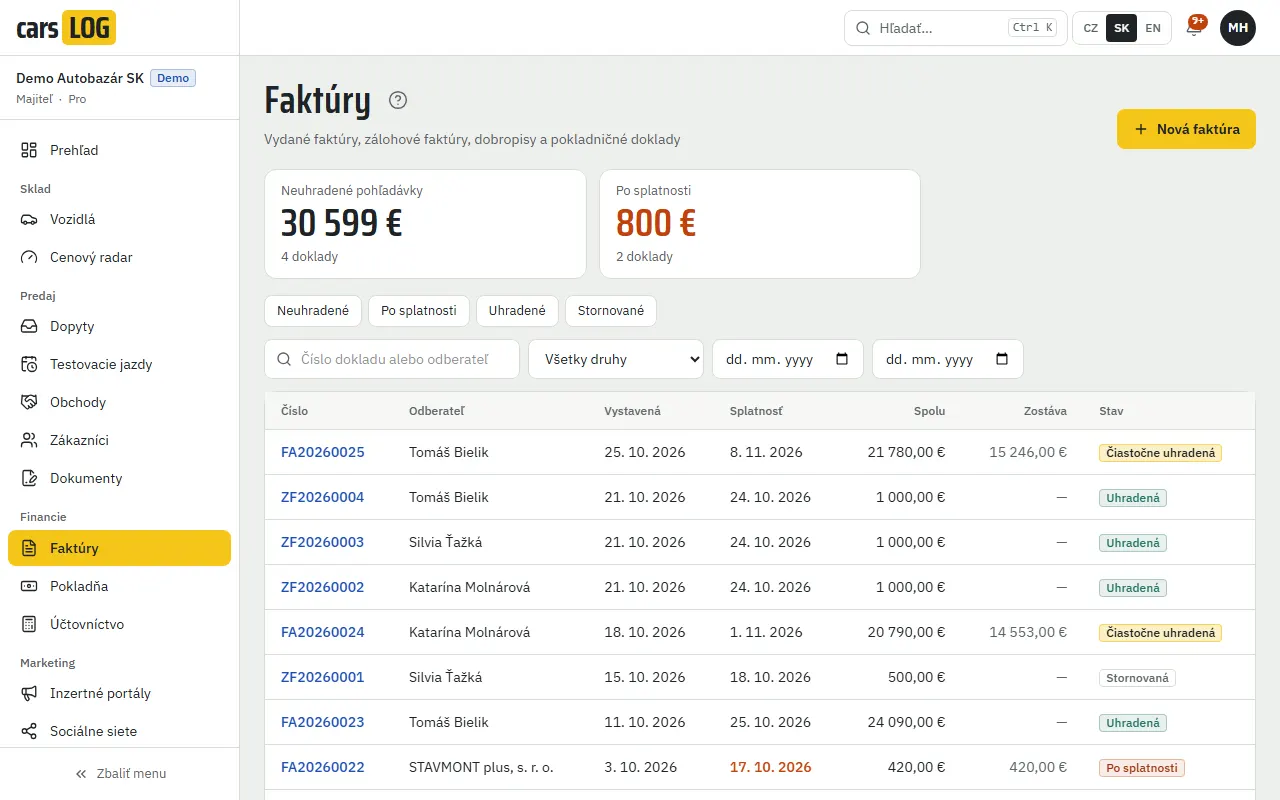
Invoices, proformas and credit notes
Issue a document from a deal or on its own. A credit note mirrors the original invoice and reduces the amount the customer still owes. A proforma invoice states that it is not a tax document.
- VAT rates valid from 1 January 2026: SK 23, 19 and 5 %, CZ 21 and 12 %
- invoices in Slovak, Czech or English
- overdue invoices are flagged automatically
VAT for used cars, too
When you sell under the margin scheme, VAT is not shown separately on the invoice and carsLOG adds the wording required by law. It is always in the language of the seller’s country, even on an English invoice.
- SK: “Úprava zdaňovania prirážky – použitý tovar”
- CZ: “Zvláštní režim – použité zboží”
- reverse charge and non-VAT-registered sellers with their own wording
QR code for payment
The invoice carries a QR code the customer scans in their banking app. The account number, amount and payment reference fill themselves in.
- PAY by square for Slovak invoices
- QR Platba for Czech invoices
- the payment reference (variable symbol) is taken from the document number
Cash desk with a daily close
Record cash income and expenses in the cash desk, including transfers between cash desks. The daily close shows the opening balance, income, expenses and closing balance.
- cash receipt and cash payment vouchers as PDF
- statutory cash limit checks: €5,000 in Slovakia, CZK 270,000 in the Czech Republic
- payments in another currency are converted at the ECB or Czech National Bank rate
- cash payments are rounded to 5 cents or to whole crowns
Export for your accountant
Export invoices and cash movements for a chosen period as XML for POHODA or as CSV. Your accountant imports them without retyping.
- POHODA XML (dataPack 2.0): issued invoices and cash vouchers
- CSV with “;” as separator and decimal commas for Excel in SK and CZ
- export history: who, when and for which period
Issue your first invoice with a QR code.
Fourteen days free, no payment card.
Frequently asked questions
Which accounting software do you support?
POHODA directly via XML import. For other software there is a CSV file that Excel can open too.
Can carsLOG issue margin scheme invoices?
Yes. VAT is not shown separately on the invoice and the statutory wording is added: “Úprava zdaňovania prirážky – použitý tovar” in Slovakia, “Zvláštní režim – použité zboží” in the Czech Republic.
Does QR payment work with Slovak and Czech banks?
Yes. Slovak invoices carry a PAY by square code, Czech invoices a QR Platba code.
Does carsLOG check the cash payment limit?
Yes. In Slovakia it adds up cash payments from the same deal, in the Czech Republic payments to the same party on the same day. It will not allow a payment over the limit, nor one in a foreign currency when no exchange rate is available.
Is the accountant’s export included in every plan?
Yes. Export to POHODA and CSV is part of every plan.